Numbered pagination in Kirby
The Kirby starterkit has a next and previous pagination markup. Very useful for single collection pages, but not at all helpful on list pages.
When browsing a collection or a list of entries, i want to present other information:
- Which page am i currently seeing?
- How many pages there are in total?
- Where am i within the list?
Final pagination on list pages:
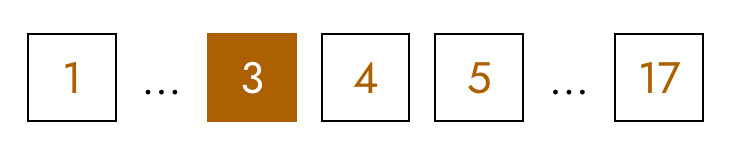
Ranged pagination it is
Step one: check out the Kirby docs. The cookbook has an entry on pagination and ranged pagination.
The code snippet displays all page links to directly go to a page as well as next and previous page. However it is missing the first and last page and a maximum of direct page link with dot dot dot. It has a range of 10 pages, i.e. in my case there were 17 pages, which i realized only when clicking through the pagination links.
Next stop: Forum
I found a helpful thread, that also optimized my initial plan on how to display the pagination links.
Initially, i was thinking of these links:
- First page
- 1, 2, 3
- dots
- last, two
- Last page
But: this forum thread had a way better and more compact way to achieve incorporating the first/last and prev/next links:
1 2 3 4 … 15
1 2 3 4 … 15
1 2 3 4 … 15
1 … 3 4 5 … 15
1 … 4 5 6 … 15
1 … 9 10 11… 15
1 … 11 12 13 … 15
1 … 12 13 14 15
Adjust the forum code snippet
Unfortunately, the forum thread only shows half of the code needed, and, since it's from 2018, there's also old code in it. Together with the reference on pagination, i combined the code snippets of the cookbook and the forum thread and made the following changes.
$pagination->countItems()is now$pagination->pages()(i'm on v5 while writing this).- The cookbook snippet uses an
echo. In the cookbook on PHP templating there's a section "Use <?= instead of echo". There's also the e() helper.- For aria-current markup, using
<?php e($pagination->isFirstPage(), 'aria-current="page"') ?> - Always use link markup , aria-current signifies the current state to screen reader users. Bonus, makes styling more straight-forward.
- remove
is-currentcss class, css style will be hooked on the attributearia-current.
- For aria-current markup, using
- Shorter aria label, the "go to" is already signified by being a link
Final code snippets
Complete code in site/snippets/pagination.php:
<?php if ($pagination->hasPages()): ?>
<nav class="pagination" aria-label="Alle Einträge">
<ul class="pagination__list">
<li>
<a class="pagination__link"
href="<?= $pagination->firstPageUrl() ?>"
<?php e($pagination->isFirstPage(), 'aria-current="page"') ?>
>1</a>
</li>
<?php if($pagination->page() > 2): ?>
<li><span class="pagination__ellipsis">…</span></li>
<?php endif ?>
<?php foreach($pagination->range(3) as $r): ?>
<?php
$noOfPages = $pagination->pages();
if($pagination->page() <= 3) { $r = $r+1 ; }
if(in_array($pagination->page(), [$noOfPages,$noOfPages-1])) {$r = $r-1;}
?>
<li>
<a class="pagination__link"
href="<?= $pagination->pageURL($r) ?>"
aria-label="Seite <?= $r ?>"
<?php e($pagination->page() == $r, 'aria-current="page"') ?>
>
<?= $r ?>
</a>
</li>
<?php endforeach ?>
<?php if($pagination->page() < $noOfPages - 2 ): ?>
<li><span class="pagination__ellipsis">…</span></li>
<?php endif ?>
<li>
<a class="pagination__link"
href="<?= $pagination->lastPageUrl() ?>"
<?php e($pagination->isLastPage(), 'aria-current="page"') ?>
><?= $noOfPages ?></a>
</li>
</ul>
</nav>
<?php endif ?> Use the pagination snippet on a list page, e.g. the page for all books:
<!-- other markup -->
<?php foreach ($books as $book): ?>
  <?php snippet('book', ['book' => $book]) ?>
<?php endforeach ?>

<!-- pagination snippet -->
<?php snippet('pagination', ['pagination' => $books->pagination()]) ?>
And this is the CSS:
.pagination {
  margin-block-start: var(--fluid-24-42);
}

.pagination__list {
  display: flex;
  flex-wrap: wrap;
  gap: 1rem;
}

.pagination__link,
.pagination__ellipsis {
  display: flex;
  justify-content: center;
  align-items: center;
  height: 2.8rem;
}

.pagination__link {
  aspect-ratio: 1/1;
  border: 1px solid var(--color-text);
  font-family: var(--font-family-accent);
  line-height: 1;
  text-decoration: none;
}

.pagination__link:hover,
.pagination__link:focus-visible {
  outline: 2px solid var(--color-text);
  outline-offset: 2px;
}

.pagination__link[aria-current] {
  background: var(--color-interactive);
  border-color: var(--color-interactive);
  color: var(--color-white);
}