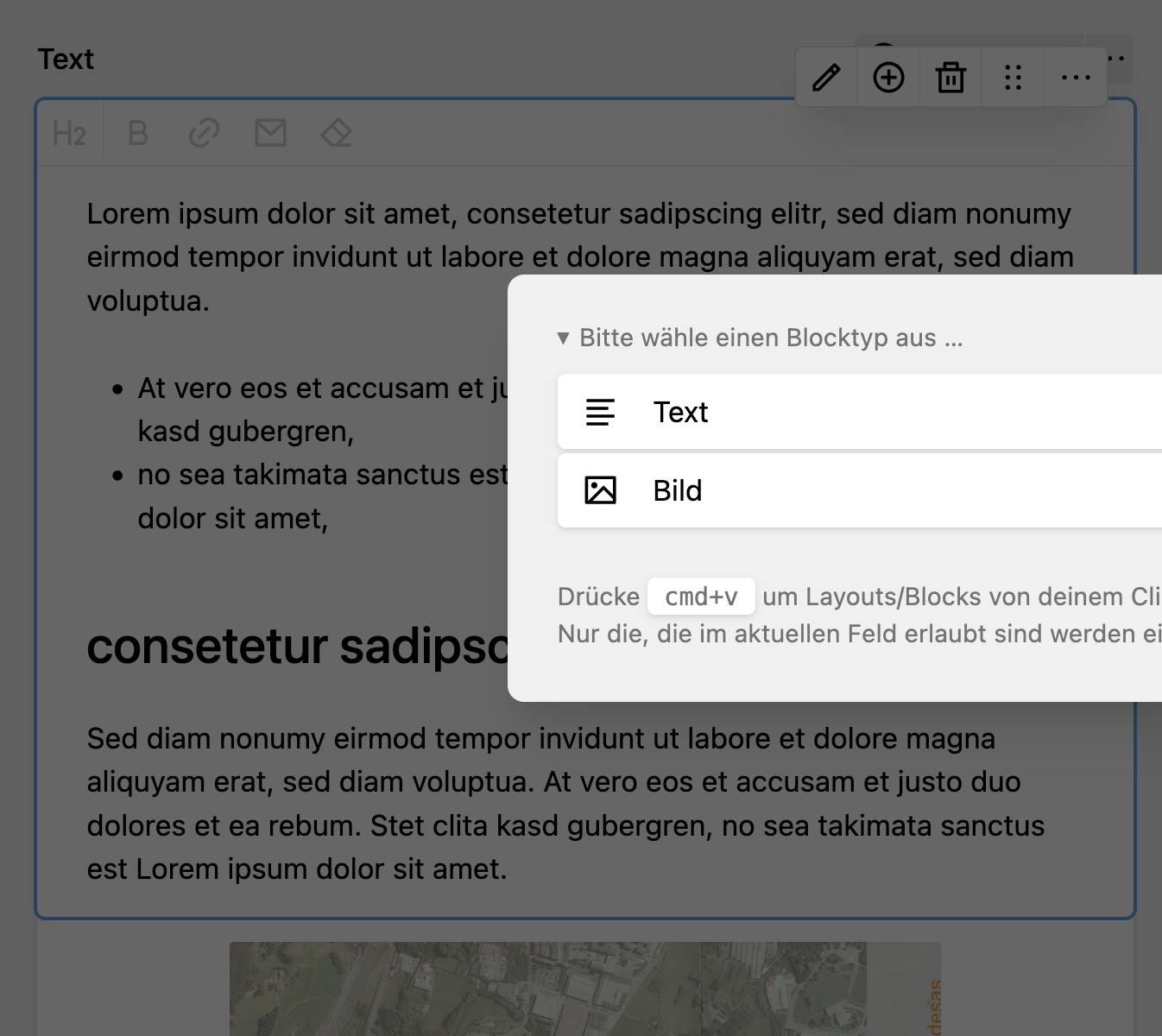
Kirby blocks with toolbar formatting
I'm currently setting up a kirby website for friends. The website has 2 collections, reviews and events. Both collections have a few metadata fields, such as event date, price, location, etc. In Kirby, these are covered with singleline text fields, date fields, etc. And then there's the free-form multiline text fields for longer texts having paragraphs, lists, headings and sometimes images. Kirby offers three types of fields for this:
- Type blocks – with predefined blocks for paragraphs, headings, images, gallery, etc, each its own block.
- Type textarea – one editor with markdown display of formats, has images with shortcode (or kirbytag as they call it).
- Type writer – also one editor, based on ProseMirror, the typical wysiwyg that displays formattings not just as markup, but it has no image button out of the box.
The difference for editors
Option 1 is the preferred way of Kirby, so to speak. Reading through the forum and documentation, it's the most marketed and most recommended option.
Option 3 would be perfect for my friends. They can start writing, shift around bits and pieces, format and reformat, headings stand out due to their bolder and larger formatting. All while staying in the general mental model of a word document editor like LibreOffice.
These approaches can be subsumed as
- first, you chose the formatting, then you add the content (formatting via blocks).
- first, you add the content, then you format it (formatting via toolbar).
In approach 1, people are forced to remember that they need a new element. People who are used to the order of first writing -> then formatting will be very tempted to use bold formatting for headings and write lists with a minus or dash "-" at line start. This is a foot gun for accessibility.
The way
For type writer Kirby has implemented a way to add custom marks/nodes with a plugin. But implementing all the image handling while the functionality already exists quickly looked like my own foot gun.
Fpr type textarea my idea was to offer a real-time updated markdown preview. I guess, with more php abilities and more time i could have hacked together something. Kirby v6 will also include preview on a side-by-side way. But alas, the deadline is end of February and the todo list still very long.
So i headed back to the blocks, wondering how i would pass the message to my friends that they should now change their habits.
The solution
Turns out, the only thing i needed was this little piece of information:
To overwrite this default blueprint, place your custom file in
/site/blueprints/blocks/text.yml.
––– https://getkirby.com/docs/reference/panel/blocks/text
The text-based blocks are also based on Writer and therefor based on ProseMirror. Effectively, it's all there.
I decided that adding an image is sufficiently different that they need to add a new block for this one. If my friends now want to move text from above the image to below the image it remains a copy & paste action.
From there i dabbled around and ended with this blueprint declaration in site/blueprints/blocks/text.yml:
name: field.blocks.text.name
icon: text
wysiwyg: true
preview: text
fields:
  text:
    type: writer
    placeholder: field.blocks.text.placeholder
    toolbar:
      inline: false
    marks:
      - bold
      - link
      - email
      - clear
    nodes:
      - heading
      - paragraph
      - bulletList
      - orderedList
    headings:
      - 2
      - 3
      - 4
And the blueprint of the single collection page site/blueprints/pages/event.yml is:
fields:
  text:
    type: blocks
    fieldsets:
      - text
      - image
This is what it looks like for the editors: